
Applies to Event Management & Employee Training Management
External (guest) users cannot view Sapiens web parts on SharePoint Pages
Overview
When external (guest) users attempt to access a SharePoint page where a Sapiens web part is visible (list of events, courses, enrollment button, etc.), they may encounter an error even though guest access has been configured in Microsoft Entra ID and the guest user has permissions to access the SharePoitn website. This article explains why this happens and how to resolve it, particularly when Sapiens is deployed using the tenant app catalog.
Problem Statement
External users who have been invited as guest users and granted access to a SharePoint site are unable to view or interact with Sapiens events, courses, etc., embedded on a SharePoint page.
Symptoms
Guest users see the following error message when accessing the SharePoint page:
“Something went wrong.
If the problem persists, contact the site administrator and give them the information in Technical details.”
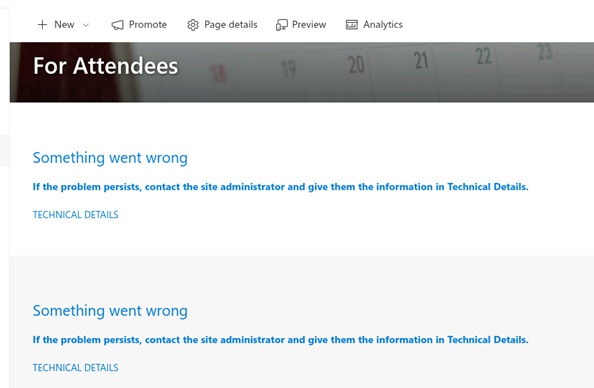
This issue may not be reproducible internally with standard internal users.
Root Cause
Sapiens is deployed via the Tenant App Catalog, which by default is not accessible to external users.
Key points:
-
By default, the Tenant App Catalog grants access to “Everyone except external users”.
-
Guest users are therefore blocked from loading SPFx-based web parts, resulting in a generic error.
-
External sharing may also be disabled on the Tenant App Catalog site.
Resolution
Option 1: Allow guest access to the Tenant App Catalog
Step 1: Enable the “Everyone” Claim (Includes Guest Users)
By default, the “Everyone” group (which includes guests) may be disabled.
-
Enable the Everyone claim at the tenant level
-
Refer to Microsoft guidance for enabling/disabling the “Everyone” group via PowerShell
Note: The “Everyone” group is different from “Everyone except external users”.
Step 2: Grant Read Access to the Tenant App Catalog
-
Go to the Tenant App Catalog site
-
Select Site Settings
-
Assign Read permissions to the “Everyone” group
Once completed, guest users should be able to load Sapiens web parts without error.
Alternative Solution: Use a Site Collection App Catalog
Instead of using the Tenant App Catalog, you can deploy Sapiens via a Site Collection App Catalog.
Why This Works
-
Guest users are explicitly added to the SharePoint site
-
The app catalog resides on the same site
-
No need to:
-
Enable the “Everyone” claim
-
Modify tenant-wide app catalog permissions
-
✅ This is often the simpler and more secure approach when Sapiens is only used on a limited number of sites.
Summary
Guest users can access Sapiens on SharePoint, but only if:
-
They can access the app catalog where Sapiens is deployed
-
External sharing and permissions are correctly configured
Most access issues stem from default Tenant App Catalog restrictions, not from Entra ID guest management itself.