
Applies to Event Management & Employee Training Management
Customizing Automatic Email Notifications per Event in Sapiens
Overview
Sapiens uses system‑generated email templates for various automated notifications, including:
- Registration confirmations
- Waiting list notifications
- Cancellation messages
- Other system‑triggered event emails
These templates are configured per site in the app settings and are not event‑specific. This means it is not possible to create separate automatic email templates for individual events.
However, Sapiens provides a flexible alternative through the use of placeholders and custom event columns, allowing you to insert event‑specific text dynamically into the shared templates.
Can email templates be customized per event?
No. Automatic email templates cannot be created or assigned per event. All events on the same site share the same set of templates.
Workaround: Dynamic customization using placeholders
Although templates cannot differ per event, you can tailor their content by inserting placeholders that pull values from event-specific columns.
Example: Using Existing Placeholders
You can insert standard placeholders such as:
Description: {evmDescription}
This automatically includes the event’s description inside the email notification.
Adding custom event fields for email content
If additional event‑specific information is required, you can create a custom column in the Event List—for example:
Column name:
Additional Information in Email
Column type:
Multiple lines of text
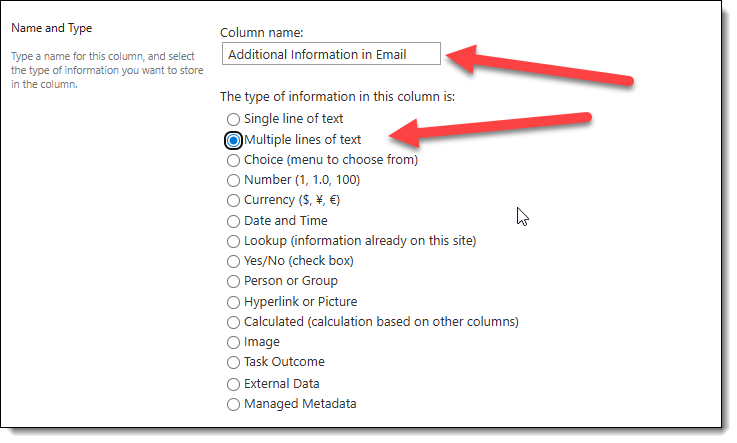
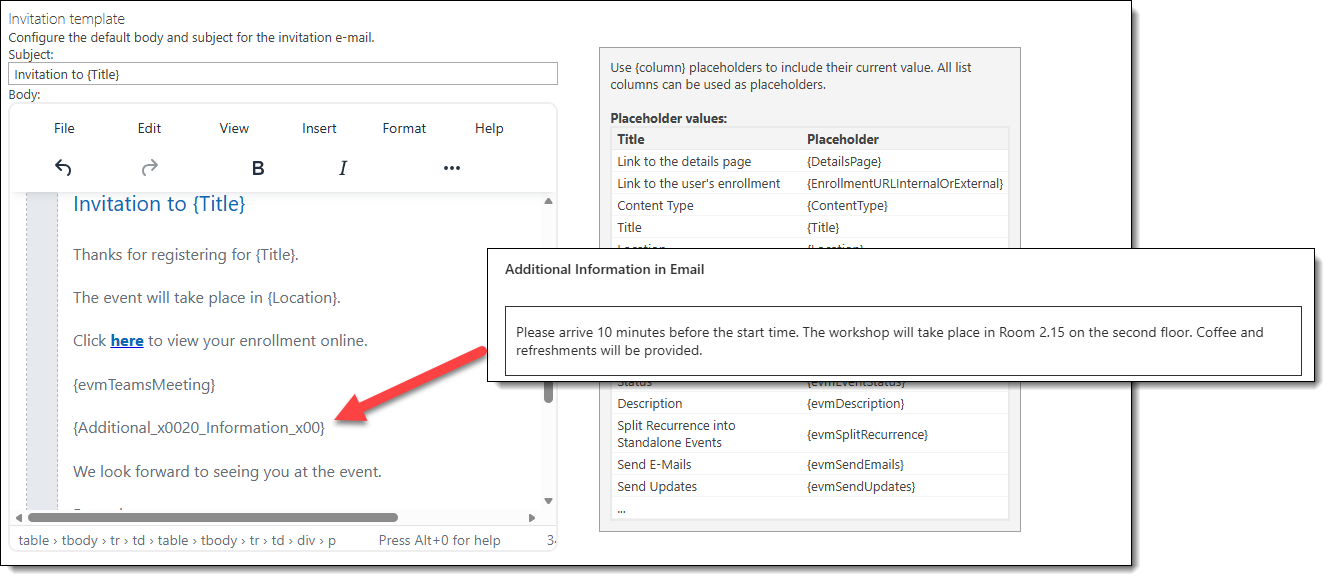
After the column is created, you can use the placeholder in any email template:
{Additional Information in Email} or the internal column name {Additional_x0020_Information_x00}.
This allows each event to display its own specific instructions, organizer details, or logistical notes within the shared automated email structure.
Benefits of this approach
- Maintains a single set of email templates
- Avoids message inconsistencies across events
- Supports complex event programs with different organizers
- Allows flexible per‑event customization without code changes
Summary
While Sapiens does not support separate email templates for each event, you can achieve event‑specific messaging by:
- Adding custom columns to the Event List
- Inserting the corresponding placeholders into the shared email templates
This approach ensures that each event can provide its own practical details and organizer information while still relying on the platform’s automatic notification system.