
-
Getting Started
-
- The Configuration Guide for Employee Training Management on SharePoint online
- The Configuration Guide to Event Management on SharePoint
- How do I configure Permissions for Employee Training Management on SharePoint Online?
- How do I configure Permissions for Event Management on SharePoint online?
- How do I configure E-Mail settings in SharePoint Online with a user account?
-
User Guide
-
Events
- How to Create Recurring Events in SharePoint
- How-to: Group multiple events to enable single enrollment for all sessions
- How to: Promote and Share Events with the Copy Link Feature
- How to: Create events in draft mode & cancel events and enrollments in one click
- How to Enable External Organizers for Events in Sapiens Event Management
- How to specify external users as organizers, facilitators, and other contacts in an event form using a contact list
- Creating Informational Events Without Registrations in SharePoint Event Management
-
Courses & Quizzes
- Configure a SCORM Cloud Account & Upload SCORM files on your SharePoint Site
- How to: Add New Achievement Options (No-Shows, Not-Achieved, Cancelled)
- How to create Self-paced Training & use our Complete Course Button webpart (Add quiz, track time, etc.)
- How to add a Quiz on SharePoint Online using Microsoft Forms
- How to: Use Microsoft 365 learning pathways in an Employee Training Management site
- How to: Create course pages with the Employee Training Management App
- Checking course completion using an anonymous quiz
- Using Curriculums in the Employee Training Management App
-
Enrollments
- How to: Copy existing enrollments from one event to the other with the Copy Enrollments option
- How to restrict the number of enrollment per user (covering the same topic/course)
- How to: Enroll Microsoft 365 groups and distribution lists
- How to: Request information upon enrollment
- How do I confirm attendance after an event?
- How to: Allow external users to enroll to events on SharePoint
- Manually managing RSVP responses in the enrollment list
-
E-Mail
- How to: Send e-mail notifications or Outlook calendar invitations and prevent e-mail updates to be sent to attendees
- How to: Send additional e-mail notifications and create reusable email templates
- How to: Send an e-mail notification when you enroll users in a course
- How do I Forward RSVP status replies to an e-mail address
- Curriculum notification behavior and available workarounds
- Customizing Automatic Email Notifications per Event in Sapiens
- Exchange Mailbox: Use a User Mailbox Instead of a Shared Mailbox
-
Teams
-
Views, Forms & Pages
- Modify and apply changes to a Template Page (of an event, course,topic...)
- How to: Use our Landing Pages Samples
- How to: show events on multiple SharePoint websites (e.g. your intranet, company news, etc.)
- How to: Promote events to specific target audiences only
- How-to: Editing forms for events, topics, courses, etc.,
- How to: Hide an event until a specific date
- How to: Personalize list views and create a Calendar View in SharePoint Online
- How to: Create customizable event pages On your SharePoint site
- Understanding Detail Pages and Course Pages
- Understanding Banner Behavior in Detail and Course Pages
-
Reporting
-
Time Zones, Regions & Languages
-
Power Automate & Power Apps
-
Installation, Updates & Uninstall
- How to add Event Management to SharePoint online
- How to add Employee Training Management to SharePoint Online
- How to add Employee Training Management to my Microsoft 365 Environment
- How to add Event Management to my Microsoft 365 environment
- Update the SharePoint|sapiens Apps
- Entra ID App-Permissions requested by Sapiens Apps
- How do I upgrade from SharePoint Add-in to Microsoft 365 App
- Employee Training Management in Microsoft Teams
- Event Management in Microsoft Teams
- Update Event Management app on all sites in the tenant using PowerShell
- How to Remove the SharePoint|sapiens App from your SharePoint Site
- Change Log and Release Notes for SharePoint|sapiens Apps
- Manual steps after the Sharegate migration
-
Troubleshooting & Known Issues
-
- Troubleshooting: Users Do Not Receive Email Invitations/Notifications
- What can I do if emails sent from SharePoint|sapiens Apps get lost in Junk Mail?
- Troubleshooting - Exchange Room Not Receiving Meeting Requests
- Troubleshooting: Meeting Response (RSVP) Not Updated in Enrollment View
- Troubleshooting: Re‑authorizing the Email Account
-
- Articles coming soon
-
Retention & Recovery
-
License
-
- Articles coming soon
Applies to Event Management and Employee Training Management on SharePoint on-premises
How do I change the Feedback Link?
Event Management and Employee Training Management were the first SharePoint add-ins we released for SharePoint 2010, later for SharePoint 2013, 2016 and finally SharePoint 2019 and SE. The apps are a great success and though the majority has moved over to Event Management or Employee Training Management on SharePoint online, there are still many customers using them in SharePoint on-premises environments.
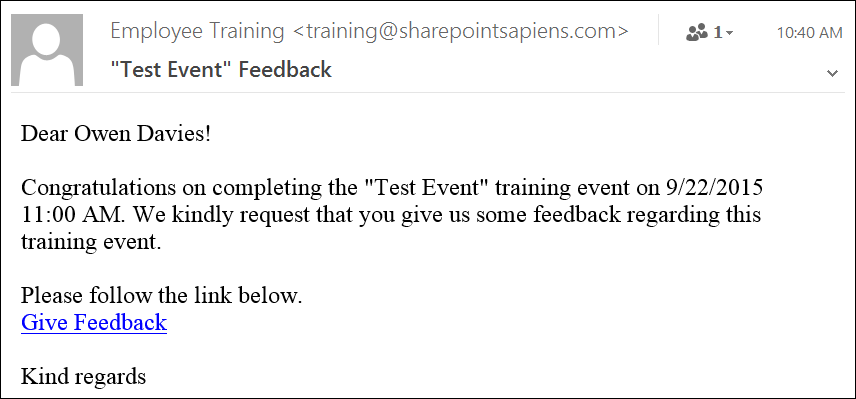
In this article, I will explain how to change the feedback link in Event Management and Employee Training Management on SharePoint on-premises. I will show you how to display text (e.g. “Give Feedback”) instead of the usual link.
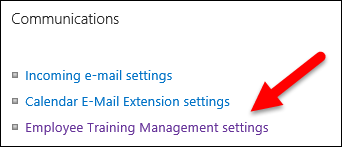
Firstly, open the Employee Training Management settings by going to the Scheduled Training Events list and clicking on List Settings. Then select Employee Training Management settings.
Click on the “Edit HTML Source” button for the feedback notification body.
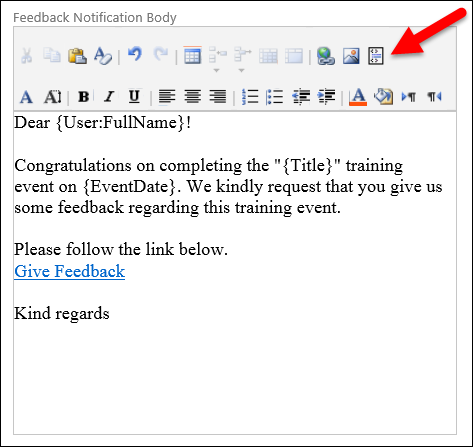
Then replace {etmFeedbackformURL} with <a href=\”{etmFeedbackformURL}\”>Give Feedback<a> or change the “Give Feedback” text as you wish.
Don’t forget to click on OK to save your changes!
I hope you found this guide useful. If you have any problems or any other questions, please send an e-mail to support.